


Did you know that 81% of all security breaches start with a weak or stolen password? (as reported by research by DemandSage and Secureframe). Account and identity verification aren’t just technical steps—they’re your company’s first defense against cyber threats.
This means that if an account is breached, a company’s customer data, financial records, and even proprietary technology could be exposed in an instant.
Traditionally, businesses relied on a simple username + password model as their main security measure. But with frequent password leaks, common employee habits rampant password reuse , and smarter hacking tactics, this approach is no longer sufficient for modern cybersecurity needs.
Three solutions have emerged as key strategies to strengthen account security:
- Password Managers
- Single Sign-On (SSO)
- Multi-Factor Authentication (MFA)
While all three are closely tied to account protection, their functions and ideal use cases differ significantly. For companies, the question is: should you implement all three, or choose based on specific needs? This article dives into the features, benefits, and best practices of each solution to help organizations determine the most effective strategy for safeguarding their accounts.
The Challenge of Account Security: Why Passwords Alone Aren’t Enough
Once the backbone of security, passwords are now the easiest way for attackers to sneak in. Here’s why:
1. Weak and Reused Passwords
According to NordPass, the most commonly used passwords worldwide are still simple sequences like “123456” or easy-to-guess words like “password.” For convenience, many employees reuse passwords across multiple accounts—94% of passwords have been used on two or more accounts—essentially giving hackers a single key to multiple doors.
2. Phishing and Social Engineering
Even complex passwords can’t protect against human error. Employees may unknowingly give away credentials by clicking on phishing emails or entering information on fake websites. Hackers don’t need to break passwords—they just need one well-crafted email to trick someone into handing it over.
3. Large-Scale Data Breaches
In recent years, major companies like Yahoo, LinkedIn, and Adobe have experienced massive account database leaks. According to the New York Post, 19 billion real passwords were exposed between 2024 and 2025 alone. These leaked credentials are often sold on the dark web, making it easy for hackers to perform “credential stuffing” attacks—using the same username and password across multiple platforms to gain unauthorized access.
4. Hidden Costs of Password Management
From an IT perspective, employees forgetting passwords and requesting resets incurs significant hidden costs. It’s not just a time sink—it slows down overall productivity and disrupts workflow.
What is Single Sign-On (SSO)?
1. Definition and How It Works
Single Sign-On (SSO) is an authentication method that allows users to log in once and gain access to multiple applications or systems without repeatedly entering credentials. You’ve likely seen this in action when websites let you sign in using your Google or Meta account with a single click.
The core idea behind SSO is centralized authentication. Organizations typically use an Identity Provider (IdP) to manage user identities and access permissions in one place. Popular SSO solutions include Okta, Microsoft Azure AD, and OneLogin.
2. Benefits of SSO
- Improved User Experience
Employees only need to remember one set of credentials to access various internal applications, reducing the frustration of forgotten passwords or frequent resets.
- Centralized Control
IT administrators can manage access from a single entry point, making it easier to add or remove users and quickly control who can access which applications.
- Reduced Risk of Password Reuse
Employees don’t need to create separate passwords for each platform, minimizing the risk of using the same password across multiple systems.
3. Drawbacks and Challenges of SSO
- Single Point of Failure
If the SSO system is compromised or experiences downtime, it could impact access to all corporate applications.
- High Implementation Costs
For small to medium-sized businesses, deploying SSO requires additional software licensing, integration work, and ongoing maintenance.
- Still Needs MFA
SSO alone only provides the convenience of “one login for multiple applications.” If credentials are stolen, security risks remain. Best practice is to combine SSO with Multi-Factor Authentication (MFA).
4. When SSO Makes Sense
- Medium to Large Enterprises: With many employees and applications spread across multiple platforms, SSO can significantly reduce login burden and IT management overhead.
- Remote Work and Cloud Applications: When employees use multiple cloud services, SSO provides centralized access management and control.
What is a Password Manager?
1. Definition and How It Works
A password manager is a software tool that helps users securely store, generate, and auto-fill passwords. Users only need to remember a single master password, while all other login credentials are centrally managed. Popular solutions include 1Password, LastPass, and Dashlane.
2. Benefits of Using a Password Manager
- Centralized Management
Employees no longer need to remember hundreds of passwords. A password manager allows them to log in to all accounts through a single platform, improving user experience and productivity.
- Automatically Generate Strong Passwords
Most password managers include built-in random generators, creating complex passwords 12–16 characters long with a mix of uppercase and lowercase letters, numbers, and symbols—greatly enhancing security.
- Reduce Password Reuse
NordPass reports that 94% of passwords are reused across two or more accounts. Implementing a password manager helps eliminate the habit of using the same password everywhere.
- Cross-Device Synchronization
Whether on a work computer, mobile device, or working remotely from home, password managers automatically sync credentials, preventing workflow interruptions caused by forgotten passwords.
3. Drawbacks of Password Managers
- Single Point of Failure
If the password manager account is compromised, all stored credentials could be at risk. For example, in 2022, LastPass experienced a major breach, exposing parts of users’ vaults and raising concerns about single points of failure.
- Security Risks Still Exist
Although most password managers use AES-256 encryption, if the master password is captured through phishing or keylogging, security can be bypassed.
- Employee Education Costs
If employees don’t understand the importance of the password manager, they might write down their master password on sticky notes—effectively reverting security to traditional, weaker methods.
4. When to Use a Password Manager
- Small to Medium Businesses: Limited IT resources can be augmented by password managers for efficient account management.
- Remote or Flexible Work Environments: Employees needing access across multiple devices benefit from password managers to reduce login issues.
- Industries with Lower Sensitivity: In sectors like retail or education, password managers provide adequate protection without high costs.
👉 Summary: Password managers solve the problem of “too many, too weak, or hard-to-remember passwords,” but due to single-point risks, they are often best combined with additional security measures like MFA for comprehensive protection.
What is Multi-Factor Authentication (MFA)?
1. Definition and How It Works
Multi-Factor Authentication (MFA) is an account security method that requires users to provide two or more verification factors when logging in to confirm their identity.
Common factors include:
- Something You Know: passwords, PINs, or security questions
- Something You Have: mobile OTPs, authenticator apps, or physical security keys (e.g., YubiKey)
- Something You Are: fingerprints, facial recognition, voiceprints, or other biometrics
By requiring multiple forms of verification, MFA significantly reduces the risk of account breaches. Even if a password is stolen, hackers are much less likely to gain access.
2. Benefits of MFA
- Significantly Enhances Account Security
Microsoft reports that implementing MFA can block 99.9% of account takeover attacks.
- Compliance with Security Regulations
International standards such as PCI DSS and NIST SP 800-63B recommend or require MFA adoption.
- Ideal for Remote and Cloud Work
In remote or hybrid work environments, MFA helps prevent unauthorized access or misuse of accounts.
3. Challenges and Limitations of MFA
- User Experience: If too complex, MFA can frustrate employees and reduce adoption.
- Additional Costs and Maintenance: Organizations need to invest in devices, software, and technical support.
- Single Point of Failure: If authentication devices are stolen, compromised, or connectivity is lost, login access may be affected.
SSO vs. MFA vs. Password Managers: Comparing Pros and Cons
In practice, relying on a single solution is often insufficient to fully protect corporate accounts. Understanding the strengths and limitations of SSO, MFA, and password managers can help organizations make informed decisions about which combination best fits their security needs.

Summary
- SSO (Single Sign-On): Focuses on convenience and centralized control, but should be paired with MFA for enhanced security.
- MFA (Multi-Factor Authentication): Provides the strongest account protection and is the core defense against account takeovers.
- Password Managers: Improve password management efficiency and help reduce the risk of employees reusing the same passwords across multiple accounts.
How Should Companies Choose? Common Scenarios and Recommended Solutions
Different organizations have varying sizes, cybersecurity needs, and IT resources. Choosing the right account security solution should depend on your company’s specific situation. Here are some typical scenarios and recommended approaches:
1. Small to Medium Businesses (SMBs): Limited Budget, Fewer Employees
- Recommended Solution: Password Manager + Basic MFA
- With fewer employee accounts, deploying SSO can be costly. A password manager allows centralized management and strong password generation, while MFA adds an extra layer of security.
2. Medium to Large Enterprises: Multiple Applications, Widespread Remote Work
- Recommended Solution: SSO + MFA
- Employees frequently log in to multiple systems, so SSO improves convenience, while MFA strengthens account security.
- For sensitive systems or financial accounts, consider adding hardware security keys or biometric MFA for even higher protection.
3. High-Security Industries: Finance, Government, Healthcare
- Recommended Solution: SSO + MFA + Password Manager
- Industries handling highly sensitive data require both convenience and robust security. SSO streamlines management, MFA ensures secure logins, and password managers generate strong, unique passwords to minimize reuse risks.
- Additional Strategy: Implementing a Zero Trust architecture can further reduce internal and external threats by dynamically verifying every access attempt.
Spotlight: Keypasco MFA—Robust, Passwordless Security with Multiple Authentication Methods
Keypasco MFA, developed by Lydsec Digital Technology, is a multi-factor authentication solution that integrates FIDO2 and FIDO UAF standards to deliver highly secure, passwordless login experiences.
Key Features:
- FIDO2 Global Standard: Reduces the burden of password management while ensuring strong security compliance.
- Simple and Secure Device Migration: Users can quickly and safely transfer authentication devices using NFC-enabled devices.
- Passwordless Login with Multiple Verification Factors: In addition to FIDO-standard authentication, Keypasco MFA combines device fingerprints, geolocation, biometrics, and other factors to provide enhanced security.
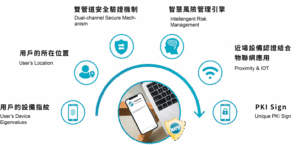
Keypasco MFA ensures that only authorized users can log in from registered devices at specified locations and times. The system uses a patented dual-channel authentication architecture, separating the login and authentication encryption channels to effectively prevent:
- Man-in-the-Middle (MiTM) attacks
- Man-in-the-Browser (MiTB) attacks
- Phishing scams
- Account takeover (ATO)
This solution is already widely adopted by financial institutions and enterprises, providing millions of users with a secure, convenient, passwordless login experience.
👉 Contact a Keypasco specialist today to learn more about MFA and elevate your account security.